FastCopy - Free File Copy Tool Runs Circles Around Explorer
- Tips and Tools
- Published May 31, 2011 Updated Sep 6, 2011
When it comes to copying files, Windows Explorer may probably be called reliable, but fast it is not. After the rewrite of the copy routines in Vista had caused much customer dissatisfaction, Microsoft rewrote the copy dialog again for Windows 7. But still, especially copying many small files takes ages.
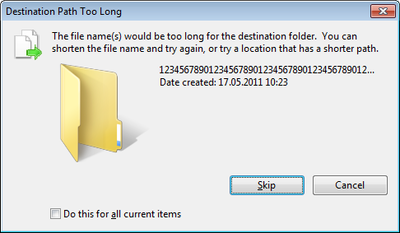
And there are other problems: Explorer does not handle long paths at all. Files and directories stored in paths longer than 260 characters (MAX_PATH) are not copied by Explorer.
A third cause of grief is that Explorer copies files via the Windows file system cache. Every byte is read from disk into that cache in RAM and then written to disk again. If large amounts of data are copied, this behavior makes the file system cache grow in size until all RAM is used up and other data (DLLs, for example) are forced out. The result is that the system feels sluggish and the hard disk spins like mad after a large copy operation until all the cached data has been read into RAM again.
Enter FastCopy
A blog post by Darwin Sanoy made me aware of an alternative to Explorer: FastCopy. FastCopy does everything right Explorer does wrong:
- It is fast (see my tests below)
- It supports long paths (longer than MAX_PATH, 260 characters)
- It does not use the Windows file system cache
And there is more:
- FastCopy is free to use and even available in source code
- It can be used as GUI or command line tool
- It can install an Explorer shell extension that places FastCopy in the context menu of files and folders
Sounds too good to be true? I hope it is not!
Tests
I performed a simple test where I copied a directory with 6,500 small files from D: to C:.
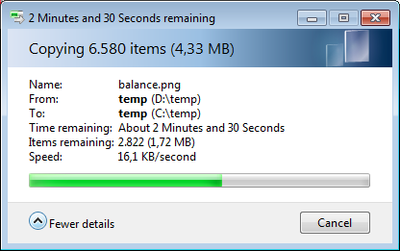
In Explorer that took 235 seconds, nearly four minutes.
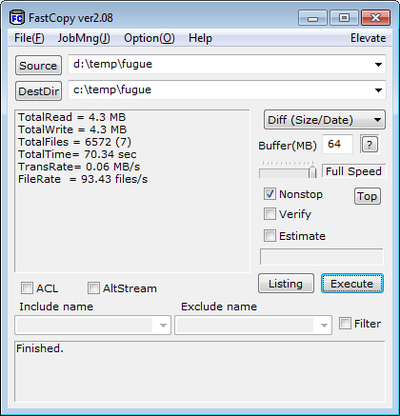
FastCopy finished in 70 seconds, just over a minute. That is more than three times faster!
Then I created a directory structure with paths longer than 500 characters (with Total Commander). Trying to copy that in Explorer gave me the following:
As expected, FastCopy had no problems with the long paths.




Comments