Factory Reset a Zehnder ComfoClime Unit
- Home Automation, Networking & Self-Hosting
- Published Sep 8, 2025 Updated Jan 9, 2026
This article describes how to perform a factory reset on the Zehnder ComfoClime 24/36 Arduino board. I find it necessary to document the steps as the description in the installation manual is incorrect.
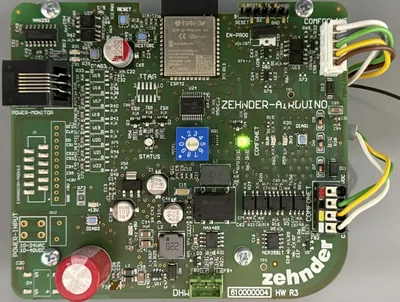
Performing a Factory Reset on the ComfoClime Arduino Board
- Press and hold the restore button.
- Press the reset button once.
- Continue to hold the restore button until the green LED to the right of the rotary switch starts blinking.
- Release the restore button.
- The Ardiuno board is reset to the factory settings.
Source
I obtained the information about the correct procedure from Zehnder’s technical support. They were unaware of the incorrect description in the manual.
Re-Provisioning After the Factory Reset
As the ComfoClime loses all settings (including the WiFi connection) during the factory reset it needs to be re-provisioned. This is easiest to do with the ComfoClime app via Bluetooth. A few tips:
- Connect your phone to the WiFi network you want the ComfoClime to join.
- The phone needs to be very close to the ComfoClime’s Arduino board for the Bluetooth connection to succeed.







Comments