Factory Reset a Zehnder ComfoClime Unit

This article describes how to perform a factory reset on the Zehnder ComfoClime 24/36 Arduino board. I find it necessary to document the steps as the description in the installation manual is incorrect.
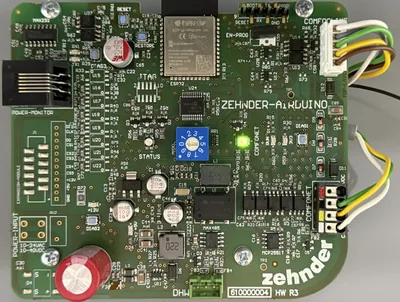
Performing a Factory Reset on the ComfoClime Arduino Board

  • Press and hold the restore button.
  • Press the reset button once.
  • Continue to hold the restore button until the green LED to the right of the rotary switch starts blinking.
  • Release the restore button.
  • The Ardiuno board is reset to the factory settings.

Source

I obtained the information about the correct procedure from Zehnder’s technical support. They were unaware of the incorrect description in the manual.

Re-Provisioning After the Factory Reset

As the ComfoClime loses all settings (including the WiFi connection) during the factory reset it needs to be re-provisioned. This is easiest to do with the ComfoClime app via Bluetooth. A few tips:

  • Connect your phone to the WiFi network you want the ComfoClime to join.
  • The phone needs to be very close to the ComfoClime’s Arduino board for the Bluetooth connection to succeed.

Comments

Related Posts

Samba & SMB Web Access Through Filestash With Passthrough Auth

Samba & SMB Web Access Through Filestash With Passthrough Auth
This article explains how to set up Filestash in a Docker container as a web interface for browser-based access to a Samba or SMB file server. This newer configuration improves on my earlier Filebrowser setup in one essential point: the SMB storage is accessed as the authenticating user, i.e., the user authentication is passed through to the backend storage. This means that each user sees exactly the directories and files they have access to. When a new file is created through Filestash, it’s stored with the proper permissions as if it had been created it via SMB.
Home Automation, Networking & Self-Hosting

How to Sync & Backup Frigate NVR Recordings to Offsite Cloud Storage

How to Sync & Backup Frigate NVR Recordings to Offsite Cloud Storage
This article shows how to synchronize your Frigate NVR recordings to offsite cloud storage for backup and safekeeping in case your onsite NVR is stolen by a burglar. Toolkit: Backblaze + rclone + Systemd Service Script I’m using Backblaze as cloud storage because it’s fast and inexpensive. It also offers temporary immutability, preventing burglars who gained access to the source machine from deleting uploaded recordings for a configurable length of time. The backup job is left to rclone, a modern file copy and sync tool for a multitude a cloud storage providers. A custom systemd service controls the backup process via a little script. To ensure low upload latency, it monitors Frigate’s recordings directory for changes and invokes rclone immediately when a new file has been created.
Home Automation, Networking & Self-Hosting

Latest Posts