Error Connecting to C$: Device Attached to the System is not Functioning

When I tried to connect to the administrative file share C$ on my wife’s computer I got the error A device attached to the system is not functioning.
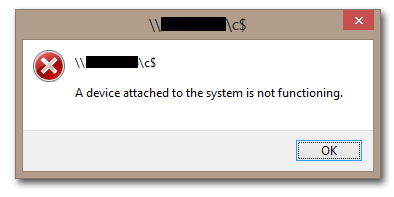
A device attached to the system is not functioning - 2

The other way round worked without a hitch, i.e. I could access my laptop’s C$ share from my wife’s computer.

When I tried to connect to her computer on the commandline I got this:

d:\>net use \\Computername\C$ /user:Computername\Username *
Type the password for \\Computername\C$:
System error 58 has occurred.

The specified server cannot perform the requested operation.

Different error message, same result.

After fruitlessly poking around some more I finally had the idea to check the target computer’s firewall settings. And indeed, file and printer sharing was disabled:
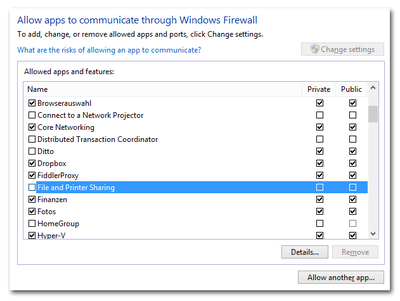
File and Printer Sharing disabled in Windows firewall

After enabling file and printer sharing for private networks and also disabling UAC remote restrictions (we are in a workgroup environment, not in a domain) things worked as expected.
Comments

Related Posts

Solved: Citrix Desktop Service Fails to Start, Logs Event 1006

Solved: Citrix Desktop Service Fails to Start, Logs Event 1006
I am sure you all love XenDesktop VDAs that just won’t register. Although this is becoming less and less of a problem I had another case recently. Checking the Obvious When a XenDesktop VDA is unregistered the first thing I do is check if the VM is actually turned on. With that out of the way I turn to the application event log, looking for entries with the source Citrix Desktop Service. This usually tells you what the problem is. Not this time, however. Apparently the Citrix Desktop Service (aka WorkstationAgent) ran into some error during startup. It logged the following event with ID 1006 and stopped:
Citrix/Terminal Services/Remote Desktop Services

Remote Management of Windows PCs in an Isolated Security Zone

Remote Management of Windows PCs in an Isolated Security Zone
With the advent of BYO it has become fashionable to regard PCs as untrusted devices that should be isolated in a dedicated security zone. Zoning Such an approach has a big advantage: by separating clients from servers it is possible to treat them differently and potentially apply more relaxed security policies - which is a basic requirement for BYO. In a truly BYO-only environment you block everything except Citrix ICA or some other remoting procotol of choice at the firewall and life is good. In real corporate networks things are a bit more complicated, however. Say you want to isolate your managed Windows PCs. In that case you might want to be able to manage them remotely from systems outside the client security zone (e.g. from management terminal servers). And suddenly you have a problem: Windows management protocols, especially RPC and DCOM, are not exactly firewall-friendly.
Security

Latest Posts

Fast & Silent 5 Watt PC: Minimizing Idle Power Usage

Fast & Silent 5 Watt PC: Minimizing Idle Power Usage
This micro-series explains how to turn the Lenovo ThinkCentre M90t Gen 6 into a smart workstation that consumes only 5 Watts when idle but reaches top Cinebench scores while staying almost imperceptibly silent. In the first post, I showed how to silence the machine by replacing and adding to Lenovo’s CPU cooler. In this second post, I’m listing the exact configuration that achieves the lofty goal of combining minimal idle power consumption with top Cinebench scores.
Hardware

Fast & Silent 5 Watt PC: Lenovo ThinkCentre M90t Modding

Fast & Silent 5 Watt PC: Lenovo ThinkCentre M90t Modding
This micro-series explains how to turn the Lenovo ThinkCentre M90t Gen 6 into a smart workstation that consumes only 5 Watts when idle but reaches top Cinebench scores while staying almost imperceptibly silent. In this first post, I’m showing how to silence the machine by replacing and adding to Lenovo’s CPU cooler. In a second post, I’m listing the exact configuration that achieves the lofty goal of combining minimal idle power consumption with top Cinebench scores.
Hardware