Enabling Multi-Processor (Parallel) Builds in Visual Studio
- Software Development
- Published Dec 14, 2019
Building larger solutions in Visual Studio can be tediously slow. Part of the reason is that the compiler does not make use of multiple CPU cores well. This article shows you how to change that.
Enabling Parallel Builds
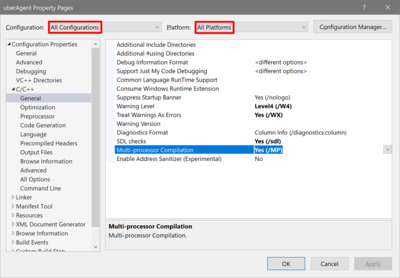
Enabling parallel (aka multi-processor, aka multi-core) builds is easy: just add the compiler switch /MP (multi-processor compilation):
Dependencies
/MP is incompatible with several other options and language features. These are discussed in Microsoft’s documentation of the /MP switch. Here is what affected us with uberAgent.
#import
If you use the #import preprocessor directive with /MP you will get the following compiler error:
Error C2813: #import is not supported with /MP
The easiest way to work around that is to specify /MP1 as an additional command-line option for the source file with the #import (yes, for individual files only).
Enable Minimal Rebuild (/Gm)
This is listed as deprecated anyway, so just switch it off.
Build Time Improvements
I did not run any lengthy tests, but here is a quick comparison of a rebuild of our uberAgent project (with multiple dependent projects) with parallel builds off and on:
- Parallel builds off (default setting): 74 s
- Parallel builds on: 44 s
The simple changes to the configuration explained above reduced the build time by 41%.
More Information
Minimum Visual Studio Version
We are using Visual Studio 2019. That is what I tested with. Obviously, I cannot give any guarantees for older versions, but from what I read this should apply to any version of Visual Studio going as far back as 2008.
Resources
- Microsoft C++ Team Blog: Recommendations to speed C++ builds in Visual Studio
- Microsoft Visual C++ documentation: /MP (Build with Multiple Processes)
- Bruce Dawson: Make VC++ Compiles Fast Through Parallel Compilation
- Stack Overflow answer to the question Strategies for multicore builds (/MP) that use #import





Comments