Disable TLS 1.0 and 1.1 in Firefox Now!
- Security
- Published Mar 23, 2020 Updated Apr 12, 2020
Mozilla had planned to disable the insecure versions 1.0 and 1.1 of the TLS protocol in Firefox 74. Unfortunately, they reverted that planned change. This post explains how to disable insecure TLS versions yourself.
How to Disable TLS 1.0 and 1.1
The tl;dr version of this article:
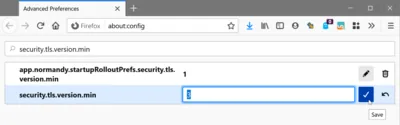
- Open a new tab and navigate to
about:config - In the search box type
security.tls.version.min - Set the value to
3and click the save icon
Why Did Mozilla Revert the Change?
The release notes for Firefox 74.0 state the following:
We reverted the change for an undetermined amount of time to better enable access to critical government sites sharing COVID19 information.
Government websites from the digital stone age. Yuck!
Explanation of the security.tls.version.min Setting
The only documentation of the security.tls.version.min setting seems to be on mozillaZine, apparently a non-HTTPS site:
- 0
- The minimum required SSL/TLS version is SSL 3.0
- 1
- The minimum required SSL/TLS version is TLS 1.0
- 2
- The minimum required SSL/TLS version is TLS 1.1
- 3
- The minimum required SSL/TLS version is TLS 1.2
- 4
- The minimum required SSL/TLS version is TLS 1.3
How to Check Your Browser’s TLS Configuration
Head over to Qualys Labs. The topmost box of the report should look like this:





Comments