Creating an Application Crash Dump
- Troubleshooting, Windows General
- Published Oct 24, 2018 Updated Mar 18, 2025
How to Create User Mode Crash Dump Files
If you experience application crashes you may be asked by support to create a crash dump file.
Enabling Local Crash Dumps for all Applications
In order to enable the creation of local crash dumps for every crashing process create the registry key:
HKLM\SOFTWARE\Microsoft\Windows\Windows Error Reporting\LocalDumps
Enabling Local Crash Dumps Globally for one Executable Only
In order to enable the creation of local crash dumps for a specific crashing process only, create the registry key:
HKLM\SOFTWARE\Microsoft\Windows\Windows Error Reporting\LocalDumps\SomeProcess.exe
Note: Adjust the process name as necessary (SomeProcess.exe in the example above).
Local Crash Dump Default Settings
By default, the LocalDumps registry key is not present. Local dump files are, therefore, not created.
Once the LocalDumps key is created, the following defaults apply:
- Dump folder: see below
- Dump count: 10 (maximum number of dump files in the dump folder)
- Dump type: mini dump
Disabling Local Crash Dumps
In order to disable the creation of local crash dumps delete the registry key:
HKLM\SOFTWARE\Microsoft\Windows\Windows Error Reporting\LocalDumps
File System Location of Local Crash Dumps
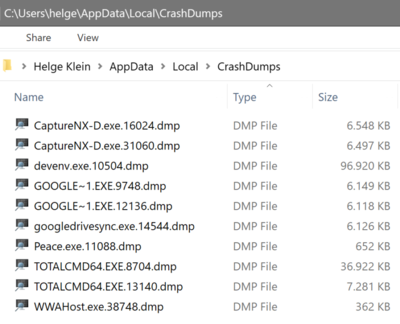
Crash dump file are stored in %LOCALAPPDATA%\CrashDumps. This is a subfolder of the user profile. For user helge it resolves to C:\Users\helge\AppData\Local\CrashDumps.
Note: if the crashing application runs under the SYSTEM account, that resolves to C:\Windows\System32\config\systemprofile\AppData\Local\CrashDumps.
More Information
- This works on all versions of Windows beginning with Vista and Server 2008 (including Windows 7, Windows 10, Windows 11, Server 2016, Server 2019, etc.).
- These dumps are configured and controlled independently of the rest of the WER infrastructure. You can make use of the local dump collection even if WER is disabled or if the user cancels WER reporting.
- Collecting User-Mode Dumps in Microsoft Docs






Comments