Contest: Why Is This Desktop Empty?

I just had a situation where I was facing an empty desktop with no way to logoff, start a program or do anything else. The only thing left to do was to log the session off from an admin session. This got me thinking: how many ways are there to create such a situation? I am writing down all the ways I know of and ask everybody to contribute. Can you come up with a way to end up with a completely empty desktop I and no one else thought of before?

This is what I am talking about:
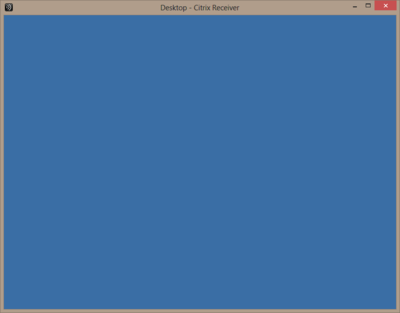
Empty published desktop

My Solutions

Explorer Killed

If you kill Explorer and have no other graphical application running, you are left with a blank screen.

Please note that if the shell is not stopped manually but crashes instead, it is restarted by default. This is governed by the registry value AutoRestartShell.

Custom Shell Closed

You can specify a custom shell through the Group Policy setting Custom User Interface. Such a shell is run on top of the default background - and can be closed by pressing ALT+F4 or by clicking the red cross in the application’s upper right corner (if available). After closing the custom shell application all that remains is the background.

Nice Try, But Does Not Work

Configuring an Invalid Custom Shell

This is tempting, but the developers at Microsoft are not stupid enough to fall for this one: specifying a custom shell through group policy that does not exist; in other words, specifying something like kasjdfljskdf. If you do that, the regular shell (Explorer.exe, of course) will come up.
Comments

Related Posts

XenApp and RDS Sizing Part 2 - Determining Farm Capacity

XenApp and RDS Sizing Part 2 - Determining Farm Capacity
This article is part of a mini-series. You can find the other articles here. As we have seen in part 1 of this series, when sizing a new farm the first thing we need to know is the capacity of the existing farm. Armed with data on capacity and additionally load, we can easily calculate the capacity of a new farm. In this article I describe how to determine capacity of the four relevant hardware components of a XenApp server: CPU, memory, storage and network.
Citrix/Terminal Services/Remote Desktop Services

Latest Posts

Fast & Silent 5 Watt PC: Minimizing Idle Power Usage

Fast & Silent 5 Watt PC: Minimizing Idle Power Usage
This micro-series explains how to turn the Lenovo ThinkCentre M90t Gen 6 into a smart workstation that consumes only 5 Watts when idle but reaches top Cinebench scores while staying almost imperceptibly silent. In the first post, I showed how to silence the machine by replacing and adding to Lenovo’s CPU cooler. In this second post, I’m listing the exact configuration that achieves the lofty goal of combining minimal idle power consumption with top Cinebench scores.
Hardware

Fast & Silent 5 Watt PC: Lenovo ThinkCentre M90t Modding

Fast & Silent 5 Watt PC: Lenovo ThinkCentre M90t Modding
This micro-series explains how to turn the Lenovo ThinkCentre M90t Gen 6 into a smart workstation that consumes only 5 Watts when idle but reaches top Cinebench scores while staying almost imperceptibly silent. In this first post, I’m showing how to silence the machine by replacing and adding to Lenovo’s CPU cooler. In a second post, I’m listing the exact configuration that achieves the lofty goal of combining minimal idle power consumption with top Cinebench scores.
Hardware