Comparison: CPU & GPU Usage of 4 Browsers
- Performance/Sizing
- Published Jun 27, 2016 Updated Sep 9, 2020
How do popular browsers differ in compute footprint when running animations? In this article I am comparing the CPU as well as the GPU utilization of Google Chrome, Microsoft Edge, Microsoft Internet Explorer and Mozilla Firefox. To make things more interesting I tested GPU performance on Nvdia and Intel.
The Test Scenario
All those four browsers did was render an animation involving fading images on microsoft.com:
Test Environment
All four browsers were running simultaneously on a Lenovo W540 equipped with Intel HD Graphics 4600 and Nvidia Quadro K1100M. Nvidias Optimus technology allows the user to control which applications have access to the Nvidia GPU. All other applications, including Desktop Window Manager and other OS components get the Intel GPU.
Browser versions used (latest at the time of writing):
- Chrome 51.0.2704.103
- Edge 25.10586.0.0
- Firefox 47.0
- Internet Explorer 11.420.10586.0
Measuring CPU and GPU Usage
All measurements were taken with our user experience and application performance monitoring product uberAgent. uberAgent determines GPU utilization per process, which is perfect for this kind of analysis. All I had to do was have the four browsers concurrently run identical workloads and look at uberAgent’s dashboards afterwards.
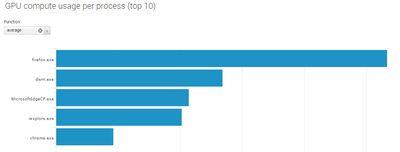
The following screenshot from uberAgent’s dashboards shows average GPU compute utilization with Intel HD Graphics 4600:
Results
Nvidia
The following table shows the CPU and GPU compute utilization per browser while each browser was configured with the Nvidia GPU.
| Browser | CPU (avg. %) | GPU compute (avg. %) |
|---|---|---|
| Chrome | 1.1 | 6.2 |
| Edge | 0.5 | 22.1 |
| Firefox | 1.0 | 7.7 |
| Internet Explorer | 0.8 | 23.0 |
Intel
The following table shows the CPU and GPU compute utilization per browser while each browser was configured with the Intel GPU.
| Browser | CPU (avg. %) | GPU compute (avg. %) |
|---|---|---|
| Chrome | 1.0 | 4.6 |
| Edge | 0.5 | 10.7 |
| Firefox | 1.0 | 26.7 |
| Internet Explorer | 0.9 | 10.1 |
Intel vs. Nvidia
The following table shows the combined CPU / GPU compute utilization of all four browsers.
| GPU | CPU - all 4 browsers (avg. %) | GPU compute - all 4 browsers (avg. %) |
|---|---|---|
| Nvidia | 3.3 | 59.0 |
| Intel | 3.4 | 52.1 |
Conclusions
There is no clear winner, rather we can observe different strategies being used by the four browsers’ developers. Edge offloads the largest part of the workload to the GPU, but that comes at the prices of high GPU utilization. Chrome, on the other hand, requires about twice the CPU resources, but in return uses GPU resources economically.
Whether it is better to use CPU or GPU resources first depends very much on the situation at hand. With laptops a deciding factor would be overall energy consumption (which I did not look at in this article).
CPU utilization is not affected by switching the Nvidia for the Intel GPU. Interestingly, the GPU utilization per browser changes significantly. Even though the Nvidia GPU nominally is much more powerful Edge and Internet Explorer need more than twice the GPU resources compared to the Intel GPU. With Firefox it is the other way round. Apparently the efficiency of the browser vendors’ GPU implementations depend more on the driver and the type of optimization than on raw hardware power.
Please bear in mind that these results are valid only for this one test case. With a different workload the numbers might be very different.








Comments