Browser Ad Blockers and Privacy
- Security
- Published Dec 18, 2017 Updated Jan 4, 2026
You have probably been in this situation: on some shopping site you put an article in your cart, but decide not to buy it after all. Later on, you notice that you are getting targeted ads for the exact same product on totally unrelated sites - or so you think. There is, however, a common denominator: the ad network. It tracks you quite effectively as you move from site to site. Many people are not exactly happy about that and turn to ad blockers to guard their privacy. This article looks at one way to measure the ad blockers’ effectiveness in terms of keeping their users’ privacy.
How to Measure Privacy
The method I used to measure how well the user’s privacy is kept is quite simple. It is based on the principle that data leakage should be avoided at the source. Ad networks cannot track you if they do not have any information about you.
With the help of our user experience and application performance monitoring product uberAgent I determined the number of different internet hosts a website communicates with. Each of those hosts has the ability to track the user - thus, the smaller the number, the better.
With a single visit to the homepage of the New York Times you become trackable by 18 advertisement/marketing companies and 6 social networks.
An Example
Opening the homepage of the New York Times in a browser without ad blockers just once resulted in communications with 84 different hosts! The list includes various ad networks and marketing analytics companies (Bizo, BlueKai, Bombora, Chartbeat, DataXu, DoubleClick, eXelate, Eyeota, Ixi, Keywee, Krux, MarkMonitor, Media6Degrees, Neustar, RapLeaf, RU4, Undertone, VisualDNA), Facebook, Google, LinkedIn, Pinterest, Twitter, and Yahoo. All of those companies can see that you accessed nytimes.com.
Measurement Procedure
For a somewhat robust measurement of the effectiveness of ad blockers with regards to privacy, I opened the world’s top 30 sites, determined the number of hosts they communicated with and compared the numbers for configurations with and without ad blockers.
Sites I Tested With
I selected the 30 sites by Alexa ranking, ignoring multiple country-specific domains per organization. Following is a full list of sites:
“Western sites” (mostly US companies):
- https://www.google.de
- https://www.youtube.com
- https://www.facebook.com
- https://www.wikipedia.org
- https://de.yahoo.com
- https://www.reddit.com
- https://www.amazon.com
- https://twitter.com
- https://outlook.live.com
- https://www.instagram.com
- https://linkedin.com
- https://netflix.com
- https://ebay.com
- https://de.pornhub.com
- https://www.bing.com
- https://www.twitch.tv
- https://www.xvideos.com
- https://www.microsoft.com
“Non-western” sites:
- https://www.baidu.com
- http://www.qq.com
- https://world.taobao.com
- https://www.tmall.com
- https://vk.com
- https://www.sohu.com
- http://www.sina.com.cn
- https://global.jd.com
- https://weibo.com
- https://360.cn
- https://yandex.ru
- https://aliexpress.com
Test Procedure
The test procedure went as follows:
- Deleted the entire browser history (including cookies and the cache)
- Opened the top 30 websites from bookmarks at the same time
- Cycled through all tabs
- Waited for 2 minutes
- Counted the number of sites contacted
- Repeated above procedure three times per test configuration
Test Configurations
I performed the tests for the following configurations
- Firefox 57 (default configuration)
- Firefox 57 + uBlock Origin
- Firefox 57 + Adblock Plus
Adblock Plus is more widely installed whereas uBlock Origin has a reputation for being fast and efficient. I used Firefox for these tests but I expect the results to be very similar to other browsers.
Results
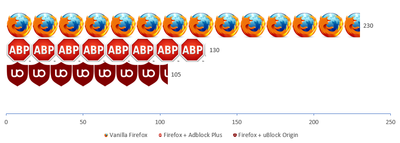
#Hosts Communicated With - All Sites
The chart below shows the total number of distinct hosts the world’s 30 top sites communicated with when each site’s homepage was accessed just once:
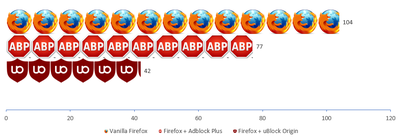
#Hosts Communicated With - “Western” Sites
The chart below shows the total number of distinct hosts the top 18 “western” sites communicated with when each site’s homepage was accessed just once:
Conclusion
As you can see in the charts above, ad blockers drastically reduce the number of hosts a website communicates with, improving privacy significantly. uBlock Origin lives up to its reputation of being more effective than Adblock Plus. Both ad blockers seem to be better optimized for “western” sites.
Comparing the top 30 sites to the New York Times, a typical media site, one cannot fail to notice that media sites apparently are much more notorious in terms of tracking and analytics than other types of sites.








Comments