AppLocker - Security Problems
- Security
- Published Aug 7, 2012 Updated Aug 6, 2012
This article is part of my small series about AppLocker, a technology built into Windows that enables administrators to audit and optionally block application execution.
AppLocker Security
There is no perfect security, every product has its vulnerabilities and AppLocker is no exception. These are the problems I am aware of.
Windows\Temp
AppLocker’s default rules allow the execution of all code from the Windows directory. This is generally considered safe, since standard users do not have permissions to write to C:\Windows and its subdirectories. However, there is one exception: users have write and execute permissions in C:\Windows\Temp by default as the following screenshot from SetACL Studio shows:
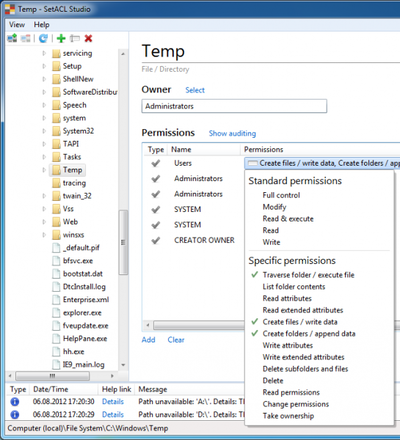
To close this loophole modify the default AppLocker rule so that it contains an exception for C:\Windows\Temp.
VBA and SANDBOX_INERT
A non-blocked process can start arbitrary executables circumventing AppLocker’s rules by calling the API function CreateRestrictedToken with the parameter SANDBOX_INERT. This is a problem because Microsoft Office will not be blocked in most if not all enterprises, and Office’s scripting language Visual Basic for Applications is well capable of calling API functions.
More information and a test program is available in Didier Steven’s blog.






Comments